今屆港姐是一個香江勵志故事:冠亞軍都是同一傳統名校出身,家長從事教育工作,自小悉心裁培。這個故事也教訓我城的小朋友和少女們,不論你的理想是做醫生還選港姐,都要讀好書、入名校。
Category Archives: General
Extending the Functions of Windows 10’s Cortana

Cortana, the digital assistant that comes with Windows 10, is Microsoft’s answer to Apple Siri and Google Now. It is quite capable, but there are times when I wish it has more features. For example, I really wanted to be able to lock my computer with a single voice command, but Cortana does not have this function built in. Fortunately, it is possible to extend Cortana’s function. To do so, we make use of the fact that Cortana searches through the start menu shortcuts when you say the keyword “open” or “launch”.
Here are the steps to create a command to lock your computer:
1. Create a shortcut in an accessible location such as the desktop. This can be achieved by pressing the right mouse button and select [New]->[Shortcut].
2. For the location of the item, enter: %SystemRoot%\System32\rundll32.exe user32.dll,LockWorkStation
3. Give the shortcut a natural name, which is what Cortana will look for when you speak to her. Since Cortana utilitizes natural language processing, it is much better at recognizing phrases that actually make sense.
4. Copy the newly created shortcut to: %SystemDrive%\ProgramData\Microsoft\Windows\Start Menu\Programs. You will need administrative privileges to complete this step.
If all goes well, you should be able to lock your computer by saying “hey Cortana, open lock computer”.
You can create similar commands to hibernate or sleep your computer. Just change the location of the item accordingly:
Hibernate: %SystemRoot%\System32\rundll32.exe Powrprof.dll,SetSuspendState Sleep
Sleep: You need PSTools from Microsoft (https://technet.microsoft.com/en-us/sysinternals/bb896649.aspx). Set item location as: [Location of PSTools]\psshutdown.exe -d -t 0
Another thing you can do is to create a command to open a website. You might think that this would be as simple as adding an internet shortcut to the start menu, but turns out it is more complicated than that: while Cortana keeps a record of internet shortcuts created through installation of programs, she does not do so with ones that are added manually. Furthermore, she does not index shortcuts that have non-executable extensions, meaning that you cannot use “chrome.exe gmail.com”, because this would be recognized as having a “.com” extension.
Here is how to get around this issue:
1. Create a text file and type in it “start ” followed by the URL you want to open.
2. Change the extension of the text file to “.bat”
3. Create a shortcut that points to the file you just created and follow the aforementioned steps.
For example, I have created a shortcut called “Gmail” that points to a “Gmail.bat” that executes “start http://www.gmail.com”. With this, Cortana would open Gmail with my computer’s default browser when I say “Hey Cortana, open Gmail”.
Upon creating the shortcuts, you might notice that the default icon is quite uninformative. You can pick a better one after you created the shortcut by right-clicking on the icon, click [Properties], followed by clicking [Change Icon…]. Enter one of the following in “Look for icons in this file” textbox, where you should find a lot of icons to choose from:
%SystemRoot%\System32\shell32.dll
%SystemRoot%\System32\imageres.dll
So here you go, try it out!

Setting up a Large-Format 4K Office Monitor

Due to space contraints in the department, several colleagues and I had to move into smaller offices. With the smaller desk I concluded that it is no longer ideal to have multiple monitors standing on the desk, and a new solution was needed. I eventually settled on mounting a 49″ 4K television on the wall, and here is what I have learnt in the process.
Rationale
A 4K display panel has the same number of pixels as four Full HD panels. A 49″ monitor thus give you roughly the same screen estimate as four 24″ Full HD ones. 24″ Full HD monitors are popular in workplace due to their comfortable pixel density for normal office work. A 49″ monitor is similarly comfortable, but with four times the area you essentially never run out of space.
Design
The primary reason why I chose a 49″ unit over smaller ones was my intention to use it for small group presentation. To accommodate this use I have installed a wall mount with a very long arm, allowing me to swing the unit to different positions.


Picking a Model
The primary consider in picking a unit is whether it support a 60hz signal, which is the usual refresh rate for computer screens. This is not easy to achieve—4K 60hz signal requires an HDMI 2.0 connection, which many cheaper units do not have. For those that do support HDMI 2.0, not all support loseless color signal, which is essential for sharp text. Based on user manuals and online forums, here is a partial list of compatibility:
- LG – The current lineup support 60hz signal and loseless color.
- Samsung – The current lineup support 60hz signal. Manuals say loseless color is supported, but online forums dispute that claim.
- Sharp – Only the top of the line models support 60hz signal and loseless color.
Once you find a compatible unit, you need to drive it with a display card. Old display cards most likely cannot drive 4K 60hz. Currently only Nvidia’s newest GTX 9xx series have HDMI 2.0 built-in, and these cards are so huge that they might not fit inside the small cases that are popular these days. For other relatively new cards with DisplayPort you can see if you can find a DP-to-HDMI 2.0 cable, which is rumored to be available but I have never tried one personally.

Settings
Modern TV use a variety of techniques to enhance images. These techniques are developed for videos, however, and are unsuitable for monitor purpose. This means you want to turn as many of these features off as possible. The list of features you want to try turning off includes:
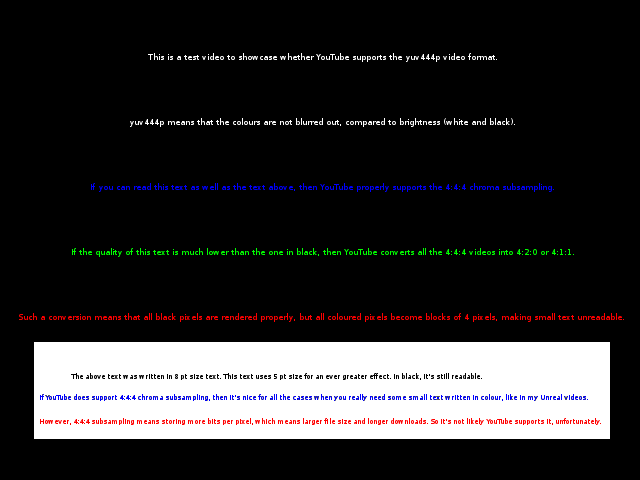
Dynamic contrast, dynamic color, automatic black level adjustment, noise reduction, Motion-Eye Care (for LG). For Samsung and LG units at least, these features—plus some others than you cannot control manually–are turned off when you label the input as “PC”. You can test whether you are settings things right by opening the this image in 100% size. If all the text including the blue one is sharp and crispy, you are good.
Limitations and Additional Thoughts
There are a couple of drawbacks in using televisions as monitors. First, they usually have glossy screen, which is not ideal for office work. Second, the glass panel is a lot thicker than typical computer monitor, and with the screen being so large, some pixels at the edges will be blocked by the glass itself. The second issue can be overcome by using the newest curved televisions from Samsung and LG, but those are a lot more expensive than their flat counterparts.

One more issue to consider is whether you need a smart TV. Smart TV provides a lot of functionalities, but with the unit being connected to a computer all the time you might not need most of them, and ‘dump’ 4K televisions are significantly cheaper than their smart counterparts.
Total Cost
LG UF6750 UHD TV: HK$6400 (comes with gifts worth approx. HK$200)
Wall mount with 60cm arm: HK$300
MSI Nvidia GTX960 display card: HK$1600
Grand Total: HK$8300 (US$1070)
Microsoft has Windows 10 Enterprise Edition’s download link mixed up with Enterprise LTSB Edition’s one. I guess they must have been too busy to check whether the links they post up were correct or not.
考慮到多媒體短訊(MMS)並不是太流行,我認為就安全計,所有人都應照建議把MMS自動攝取馬上關掉。
Given how rarely-used MMS are in practice, I would suggest simply following the recommended remedy of turning of “auto-retrival”of MMS messages in the settings menu of your messaging app.
http://blog.zimperium.com/experts-found-a-unicorn-in-the-heart-of-android/
一次捐血會抽取約470mL的血,大概是成人體內血液的10%左右。根據香港某醫療專家近期的說法,其實一次過捐十包血都不會對健康有明顯威脅,畢竟一生拉勻計,一年都捐不到一包,而大把人係每年捐二三次的。

週未和一眾友人去明將午膳,沒想到竟會是這麼富教育意義。
當整整兩小時作戰裡,舉目盡是進迫的日式軍艦,我明白到北洋艦隊在甲午海戰時是如何的無助。
當軌道上滿佈盤子,好些甚至被擠出飛墜地上,我明白到祖國高鐵至今才發生過一次出軌意外是多麼重大的成就。
當一連十盤棕色疑似嘔吐物軍艦之後是一連十盤綠色疑似嘔吐物軍艦,我明白到甚麼是中國特色的創意。
當在這一切之下,明將還是滿座的時候,我終於明白到,很多香港人,原來真心願意吃住先。
(圖:週日下午攝於深水埗明將)
Bad guys are often unbelievably dumb in movies. Turns out they can be equally dumb in reality—like #HackingTeam‘s passwords being “Passw0rd”. Seriously guys?
(Source: https://twitter.com/alexs…/status/617959306495946752/photo/1)

真人真事:話說有一年弟弟應邀回母校分享求學經歷,台下不少同學自顧自閒談個不停。在校時曾任Second Prefect*的弟弟二話不說一個膠水樽扔過去,全場頓時鴉雀無聲,學生在後續的討論中也變得積極很多。
我想說的是,母校學生紀律每況愈下又欺善怕惡,當中揭示的不是「金玉其外,敗絮其中」,而是學生比以前幼稚,不懂造作。上一輩的舊生,見人講人話,見鬼講鬼話,在藍血禮儀和本土粗口之間揮灑自如。這種長袖善舞的本領,才是母校畢業生之所以能成為各領域掌權人的正真原因。
所以說到教導這輩不知世故的學生,我會說:讓我們舊生來吧。
*副總學生長,負責學生紀律,在全校學生中只在一人之下
Random Stata Error Series: “diagonal elements should be 1”
If you try to use the correlation matrix from either corr or spearman in drawnorm, Stata sometimes give you this error. The issue is the correlation matrix seems to be in float precision, but Stata logical operations work in double precision.
One way to get around this problem is to manually replace all diagonal elements with 1. By ‘manual’ I mean use a script of course.